Interactive Seat Map Software Features
Everything you need to design, render, embed, and operate interactive seating charts at any scale — from a 200-seat theater to a 170,000-seat stadium.
Design — Visual Seat Map Editor
Build a production-ready seating chart for any venue in hours, not weeks. The browser-based editor combines drag-and-drop tools with engineering-grade alignment so a single designer can ship arenas, theaters, stadiums, clubs, and conference halls without round-trips to a CAD operator.
Drag-and-drop seat rows, sections, tables, standing zones, and mixed layouts in a single canvas.
Venue Shape tool aligns rows to the real geometry of curved arenas and stadiums.
Auto Outlines render clean section boundaries with one click; tweak padding and labels inline.
Import existing SVG floor plans from your graphic designer and export back to SVG at any time.
Reusable, version-controlled schemas — duplicate one venue across multiple events and configurations.
Render — WebGL Booking Renderer
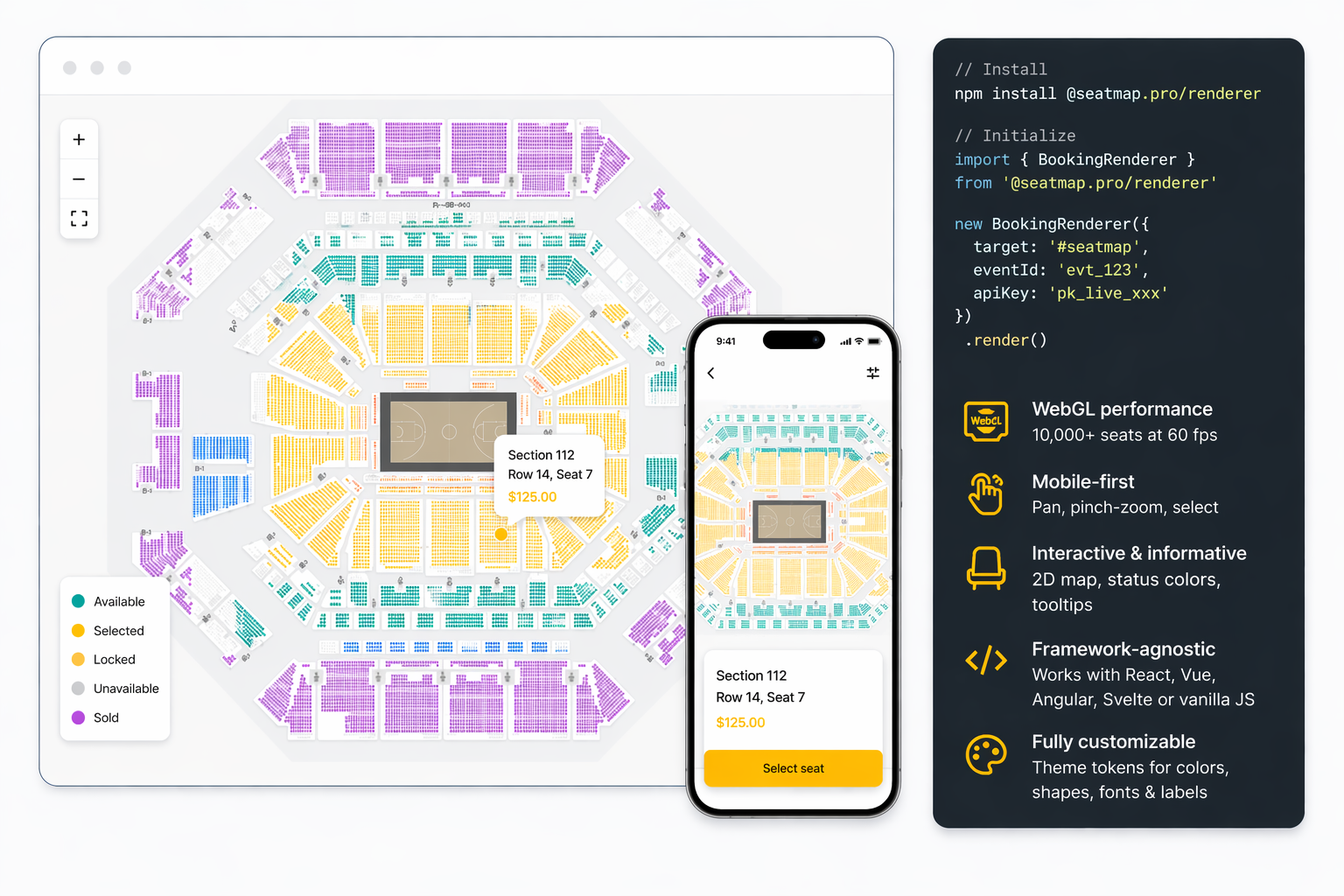
A JavaScript seating chart library purpose-built for ticketing. The Booking Renderer paints 10,000+ seats at 60 fps with WebGL, switches level-of-detail automatically as users zoom, and ships with mobile-first interaction baked in. Drop it into any frontend stack with a few lines of code.
WebGL pipeline scales smoothly from a 200-seat theater to a 170,000-seat stadium.
Touch-friendly pan, pinch-zoom, and selection on phones and tablets out of the box.
2D interactive seat map with per-seat status colors, tooltips, and section photos handed to your booking page.
Framework-agnostic — works inside React, Vue, Angular, Svelte, or vanilla JavaScript.
Theme tokens for colors, seat shapes, fonts, and labels so the renderer matches your brand.
Integrate — REST API & JavaScript SDK
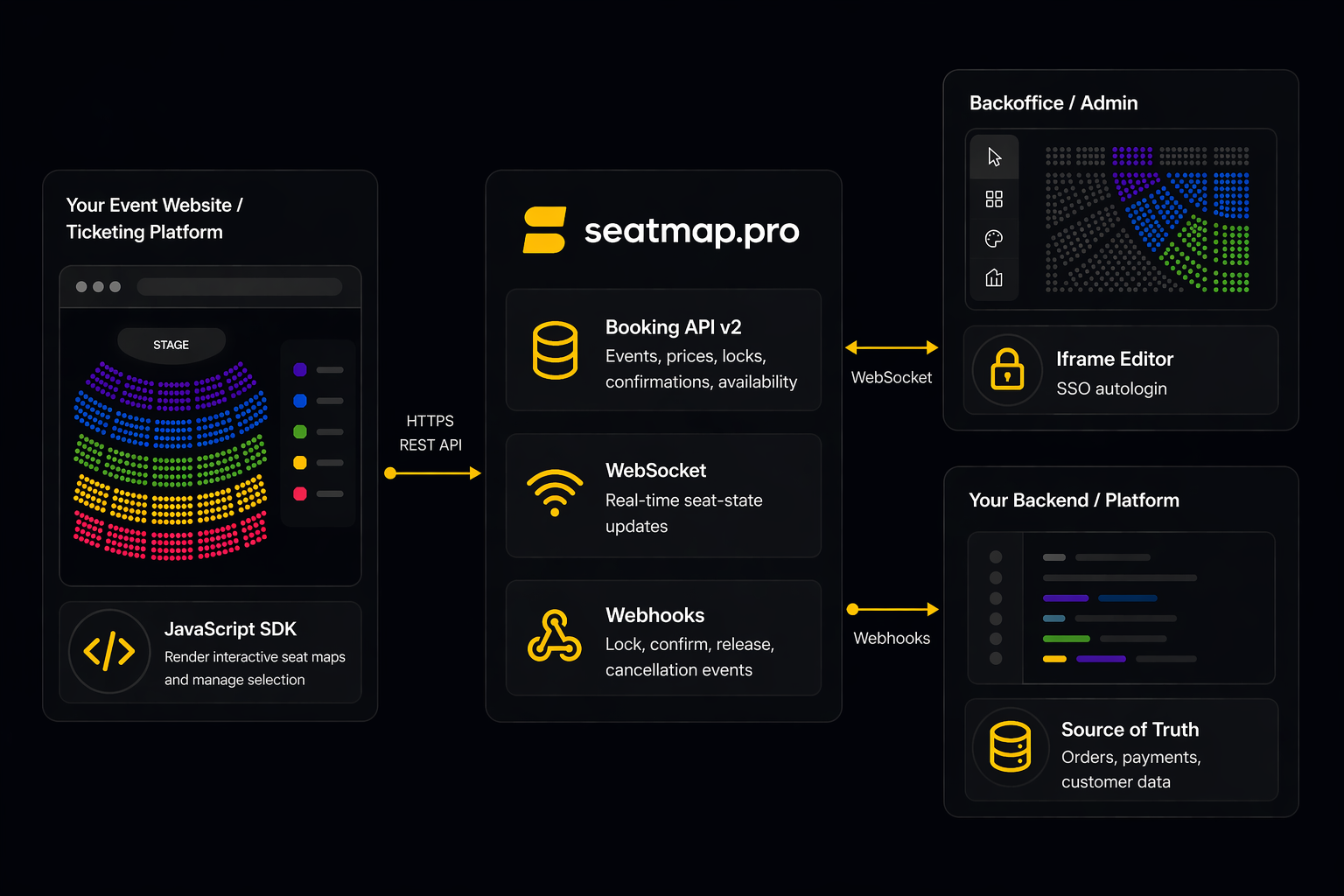
Embed an interactive seating chart on any event website or ticketing platform without rebuilding your booking stack. The Booking API v2 handles events, pricing, locks, and confirmations; the TypeScript SDK handles rendering and selection. Your ticketing system stays the source of truth for orders and payments.
Install @seatmap.pro/renderer from npm and mount it on any container element.
Booking API v2 covers events, prices, the lock-confirm flow, and server-held booking sessions.
Iframe-embed the visual Editor inside your backoffice with SSO autologin.
The server settles every seat conflict, so two buyers clicking the same seat cannot both hold it.
Webhooks notify your backend when venues, schemas, and seat maps change.
Operate — Multi-Venue, Multi-Tenant, White-Label
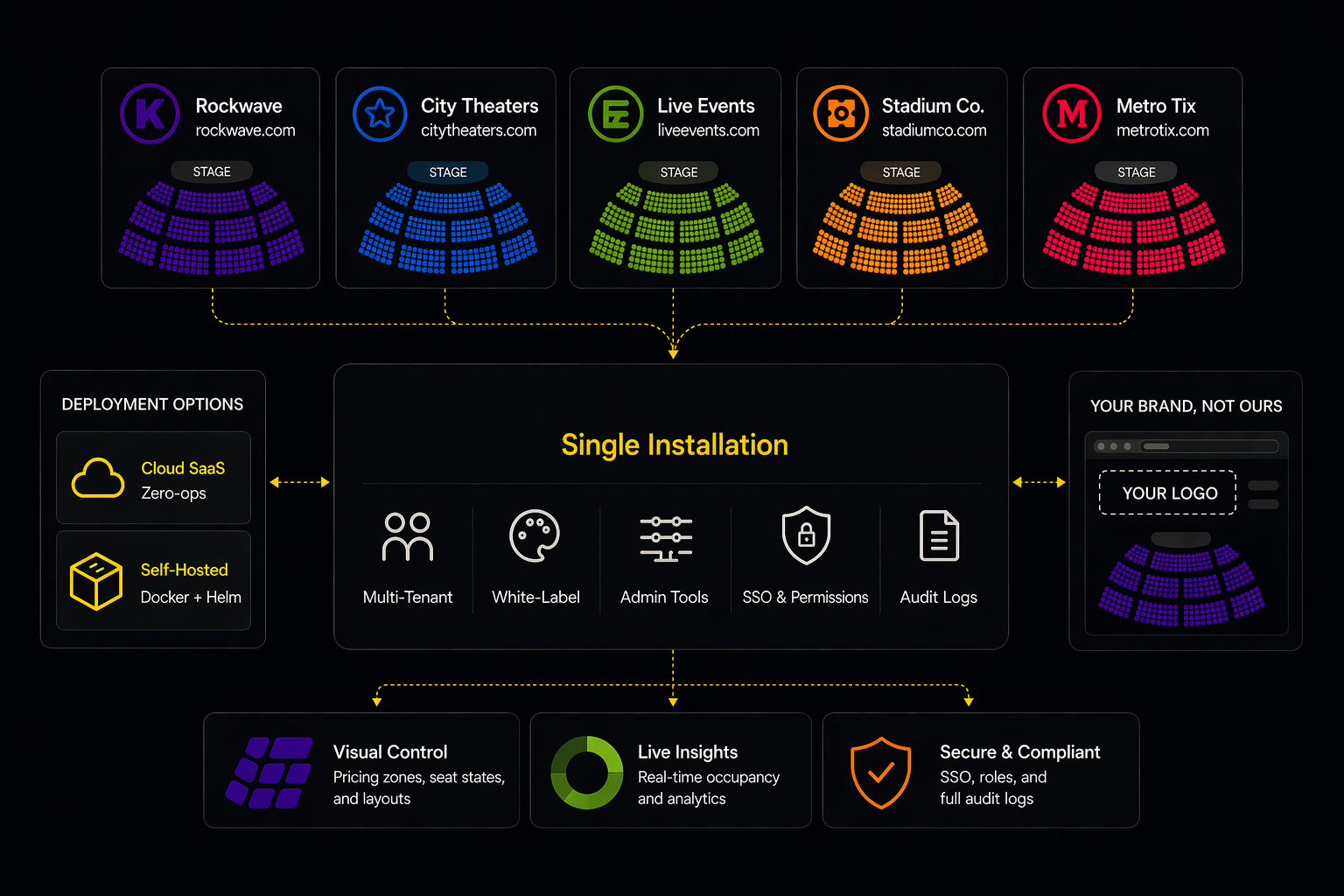
Run one installation across many organizations, brands, and venues. Pick cloud SaaS for zero-ops, or self-host with Docker and Helm for full data residency control. Customize every visible surface so customers see your brand, not ours.
Multi-tenant by design — separate organizations, venues, users, and roles in a single deployment.
White-label theming with no Seatmap Pro branding required on customer-facing surfaces.
Admin Renderer for visual pricing zones, bulk seat-state edits, and occupancy views.
Cloud SaaS or on-premise via signed Docker images and a maintained Helm chart.
SSO via SAML and OIDC, granular per-venue permissions, full audit logs.
Frequently Asked Questions
Common questions from event organizers, ticketing platforms, and developers evaluating Seatmap Pro.
Who provides customizable seating charts for venues?
Seatmap Pro provides fully customizable seating charts for venues of any size. The visual Editor lets you design numbered seats, general admission zones, tables, and standing areas, then theme every surface — seat colors, seat shapes, fonts, and labels — to match your brand. Schemas scale from a 200-seat theater to a 170,000-seat stadium, and the same white-label renderer embeds into any ticketing website via the JavaScript SDK.
Can I integrate an interactive seating plan with my existing event website?
Yes. The interactive renderer is framework-agnostic — it mounts into React, Vue, Angular, Svelte, or a vanilla JavaScript page as a single component, so it fits your existing frontend instead of replacing it. Your ticketing system keeps full ownership of orders, payments, and customer data, while the Booking API v2 drives events, pricing, and the lock-confirm flow. The step-by-step SDK and Booking API v2 walkthrough lives in the integration guide.
What is the best JavaScript seating chart library for ticketing platforms?
Seatmap Pro's Booking Renderer is a TypeScript SDK published as @seatmap.pro/renderer on npm. It uses WebGL to render 10,000+ seats at 60 fps, ships with mobile-first interactions, supports custom theming, and is framework-agnostic. It pairs with the REST Booking API v2 for the full lock-confirm booking lifecycle.
Does Seatmap Pro support real-time seat selection and availability?
Seat holds are settled on the server at the moment of each click, while the map shows availability as of when the event loaded. The Booking API will not lock a seat that is already held, so two users picking the same seat at the same time cannot both hold it. Booking sessions, added in 1.73.0 and turned on per organization, keep each buyer's seats in a server-held cart, put them back on sale when the hold time runs out, and sell the whole cart or none of it at confirm.
Does Seatmap Pro offer 3D seat maps or only 2D?
Seatmap Pro renders 2D interactive seat maps optimized for fast selection and high-volume ticket sales. Instead of a full 3D model, each section can carry up to ten photos, such as the view from its seats, which the renderer hands to your booking page to show.
Which venue types does Seatmap Pro support?
Concert halls, theaters, stadiums, arenas, conference centers, clubs, and any mixed layout that combines numbered seats, general admission zones, tables, and standing areas. The editor scales from a 200-seat indie theater to a 170,000-seat stadium without changing tools.
Can I customize seats for different access levels — VIP, accessibility, season ticket holders?
Yes. Each seat carries arbitrary metadata you can use to mark categories like VIP, wheelchair-accessible, restricted view, season holder, or hold-back inventory. The renderer can color, label, or hide seats based on the viewer's role, so different audiences see different versions of the same chart.
Can I deploy Seatmap Pro on-premise instead of using the SaaS?
Yes. The full platform ships as signed Docker images and a maintained Helm chart for Kubernetes. On-premise deployment gives you full control over data residency, network isolation, and version upgrades. SaaS and on-premise share the same APIs and SDKs, so integration code is identical across both.
How does Seatmap Pro handle multi-venue and multi-tenant setups?
A single installation supports many organizations, each with multiple venues, schemas, events, users, and roles. SSO via SAML and OIDC, per-venue permissions, and audit logs make it suitable for enterprise ticketing platforms managing customer brands or for venue groups operating dozens of locations from one backoffice.
Ready to Get Started?
Request a demo, and see Seatmap Pro in action. Map out your success with a secure, user-friendly and versatile solution for ticketing platforms.
Request a Demo