Seatmap Pro 1.49.0: Custom Seat Numbering and WebGL Control
Seatmap Pro 1.49.0 introduces two useful updates that give you more control over seat management and rendering behavior.
Try Seatmap Pro's live playground: preview rendering modes, test seat selection, customize themes, and explore SDK parameters directly in your browser with zero setup.

Seatmap Pro Playground is a fast, visual way to explore everything the Renderer can do – directly in your browser, with zero setup.
It’s designed for anyone working with interactive seating maps: developers integrating the SDK, designers experimenting with themes, or product teams reviewing how map behavior matches the user experience. You can preview rendering behavior, test cart logic, fine-tune parameters, and explore live presets –all without writing code or deploying anything.
At the heart of the Playground is a growing gallery of presets – preconfigured setups that showcase how different features behave. You can load high-performance WebGL maps, navigate seating by row or explore general admission layouts.
Each preset comes ready to run, and you can tweak parameters in place to see how the Renderer responds. It’s the fastest way to understand how map settings translate into visual behavior – especially useful when you want to share configurations across teams or validate ideas before implementation.
Browse the full gallery here: Presets Collection →
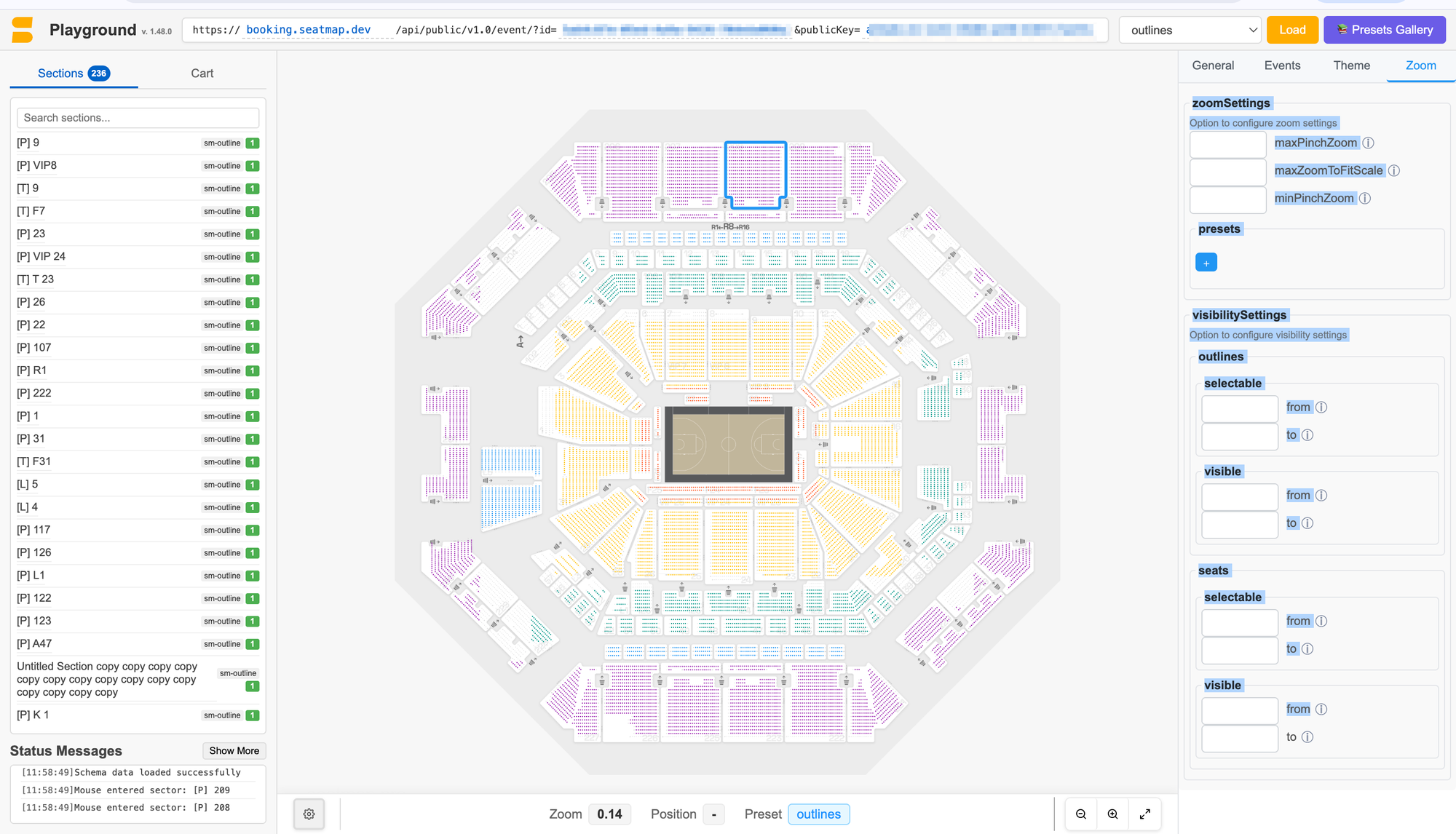
The Playground exposes all the key configuration sections of the Seatmap Pro Renderer:
publicKey;onSeatSelect, onRedrawStart, onZoomEnd, and onBeforeSeatDraw, so you can test how the Renderer reacts to user actions;Each of these can be changed directly in the Playground interface. Adjust a value, hit “Load” and instantly see the result. It’s a smooth workflow for testing and understanding complex behaviors without needing to rebuild your integration.
In addition to rendering, the Playground supports cart interactions. You can initialize a cart, select or deselect seats, and watch how the Renderer updates availability and triggers status messages.
This gives you a complete view of user interactions – including seat locking, selection limits, and price group behavior – exactly as they would appear in production. It’s a powerful way to verify logic or demonstrate flows before your backend is fully connected.
The Playground is designed to be useful beyond development. Designers can test theme changes or layout behavior. Product managers can explore interaction patterns. QA teams can quickly reproduce issues and experiment with fixes.
Because everything runs in the browser and uses real event data, it’s easy for teams to explore ideas, share configurations, and reach alignment — without extra tooling or local builds.
You can start exploring today using the built-in presets, or load your own event by entering:
If you don’t have these yet, just request a demo – once you are ready to go, we’ll provide test access to the Editor, along with your own sample event so you can try the Playground with real data.
Seatmap Pro 1.49.0 introduces two useful updates that give you more control over seat management and rendering behavior.
We’re excited to introduce two powerful updates in Seatmap Pro 1.48.0 that streamline your workflow and enhance accessibility across the Editor and Booking
A mid-year recap of the main changes